



- Language

Windlogger Tools
How to use the LeWL wind logger Excel template
How to use the LeWL Java application to calculate wind data
F.A.Q LeWL Wind data logger
How do I connect the Pro-D anemometer to the LeWL windlogger?
How do I connect the Vortex anemometer to the LeWL windlogger?
How do I setup a different wind sensor for the LeWL?
How do I get the LeWL files?
Should I leave the SD card on the LeWL windlogger?
What type of SD card should I use?
Is the LeWL windlogger waterproof?
How long do the batteries last?
What is the difference between WindTracker and the LeWL wind logger?
Where can I download documentation for the LeWL windlogger?
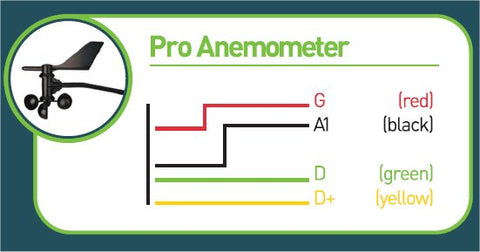
How do I connect the Pro-D anemometer to the LeWL windlogger?
To connect the Pro-D using its pre-fitted connector, remove the Windlogger cable gland outer nut and pull out the rubber seal. Pass the Pro-D cable end and connector through the nut, slip the split seal over the cable near the connector, and pass the connector through the gland into the WindLogger enclosure and plug it into the socket. Push the rubber seal into the gland and tighten the nut onto the gland to clamp the cable.
For older windloggers, to connect the Pro-D anemometer you will need to cut off the connector and strip off a bit of sleeve of the 13 meters of cable it come it comes with. You’ll see 4 cable cores: Yellow, Red, Black and Green. Connect them as shown below to the LeWL terminals:
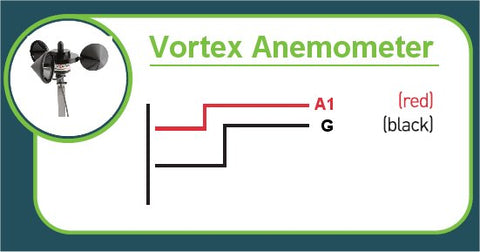
How do I connect the Vortex anemometer to the LeWL?
To connect the vortex anemometer, please follow the connection diagram below to connect to the main LeWL terminals:
How do I setup a different wind sensor for the LeWL?
By default you do not need to do any of this. It is already done for you when you buy any of the LeWL kits.
You can also change different types of sensors by using the supplied LeWL application, running it from the SD card. You can download the app here
If you need to enter different calibration sensor, please refer to the main manual.
How do I get the LeWL files?
The WindLogger generates a file for each month of data recorded. The SD card must be left in the logger during logging. To collect the data, just eject the SD card (push end of card into its socket to eject) from the logger and insert it into your computer's card reader. The log files are in CSV format and can be opened/imported easily with any spreadsheet software like Excel.
To read the data from the memory card, use any computer SD card reader compatible adapter. After inserting the memory card into the adapter, a new drive should appear on your computer with all the files that have been logged. For 1 minute or 10 minute logging intervals, files are archived by month:
For example example "AUG07.CSV" will contain all the relevant data from August 2007. The first line/row contains the name of the data value for that column.
Data Extraction
|
© Logic Energy Ltd. LeWL v5.2.3sd |
|||||||||
|
Date |
Time |
Direction |
Temp.oC |
Wind1avg |
Wind1max |
Wind1std |
Wind2avg |
Wind2max |
Wind2std |
|
01/08/2007 |
09:00:28 |
225 |
1.25 |
3.64 |
4.23 |
0.18 |
0 |
0 |
0 |
|
01/08/2007 |
09:01:28 |
225 |
1.22 |
3.21 |
4.51 |
0.12 |
0 |
0 |
0 |
Direction: Wind direction (heading) in degrees (0o to 360o)
Temp *C: Temperature in degrees Celsius
Wind1avg: Average wind speed in meters/second (m/s) for A1 input Wind1max: Maximum wi nd speed recorded for A1 in m/s Wind1std: Standard Deviation of wind speed for A1
Wind2avg: Average wind speed in m/s for A2 input Wind2max: Maximum wi nd speed recorded for A2 in m/s Wind2std: Standard Deviation of wind speed for A2
Yes, you should leave the SD card in the LeWL, otherwise the wind data logger will not be able to record any data.
What type of SD card should I use?
We recommend a card no bigger than 256MB. We supply the LeWL with an industrial grade SD card but the unit can work with other low power SD cards.
Is the LeWL waterproof?
Yes, It is ABS IP65 rated. Just make sure the gland is always pointing down when installing it.
How long do the batteries last?
What is the difference between WindTracker and the LeWL wind logger?
WindTracker is a tool for people with an interest in wind energy who want to find out how much potential wind energy is at their site. The results are a summary of the site’s wind profile
LeWL windlogger is a more professional tool for more advanced users. It generates a lot of data with wind turbulence values and it allows for multiple anemometers to be connected at once. The LeWL windlogger generates plain CSV files that can be imported into other sophisticated wind analysis tools.
For a comparison TABLE please click here
Where can I download documentation for the LeWL windlogger?
Download brochure


